
How to Manage Multiple Client Social Media Accounts
If you run social for more than two clients, you already know the failure mode. Twelve browser tabs. Three private windows. A note that just says "Karen, login?" You log into the wrong account, post a draft caption to the wrong brand, and spend an hour talking yourself off a ledge. Discipline isn't going to fix this. The tool is.
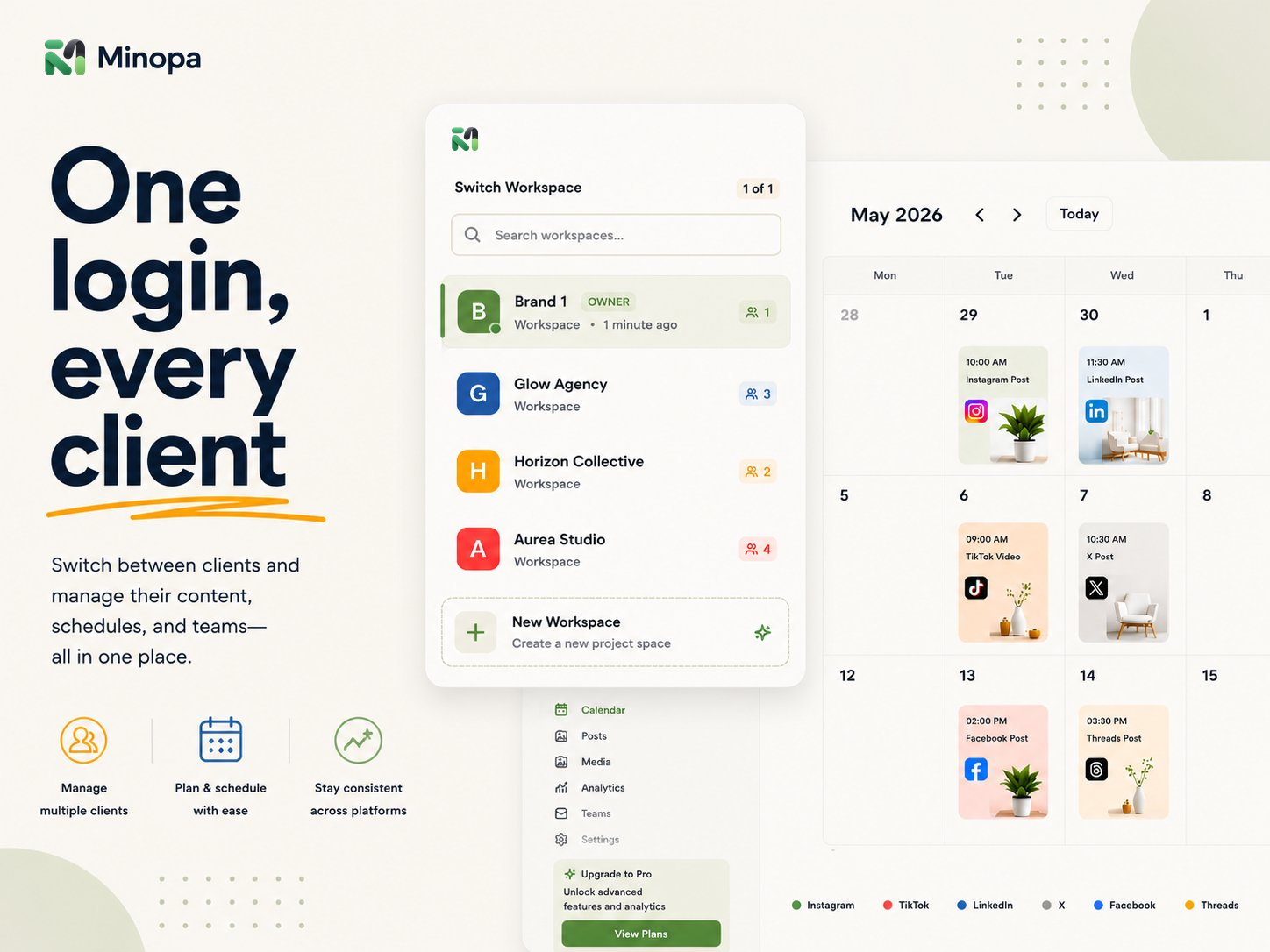
That's the real shift when you're trying to manage multiple client social media accounts: stop treating each client as a separate native login problem and start treating them as workspaces inside one platform. Minopa is built around exactly this idea, multiple workspaces under one account with instant switching between them. One login, one calendar surface, every client.
This post walks through the actual workflow: how to set up a client per workspace, who you invite where, how permissions keep you out of trouble, and the publishing flow that keeps the wrong post from going to the wrong feed.
Why tab-juggling breaks at three clients
One client is fine. You can stay logged into Buffer or Later or whatever else and call it a day. Two clients still works if you're careful. At three, something quiet starts going wrong.
You stop checking which account you're logged into before you click publish. You start labeling Chrome profiles "Client A real," "Client A backup," "Client B." You write captions in the wrong tab. You schedule a post for Tuesday and only notice on Wednesday it went out under your own brand. None of that is a personal failing. It's the predictable result of running five separate tools in five separate browser sessions and asking your own attention to be the integration layer.
The fix is structural. Every client gets its own workspace, every workspace holds its own connected social accounts, and you switch between them from a dropdown. Not a tab. Not a private window. A dropdown.
One workspace per client, always
The rule is simple. One workspace per client, no exceptions, even for the small ones.
Putting two clients in the same workspace looks tempting when one is tiny, "they only post twice a month, why bother." Don't. The first time you cross-post a draft, lose track of who owns which media folder, or have to explain to a client why their assets are sitting next to another brand's, you'll wish you'd kept them apart from day one. Workspaces are cheap. Mistakes aren't.
In Minopa, each workspace is fully isolated:
- Its own connected social accounts (Instagram, Facebook, X, LinkedIn, TikTok, Threads, Pinterest)
- Its own media library and folders
- Its own calendar and scheduled posts
- Its own team members and permissions
Switching between them is a single click. The whole UI updates: calendar, drafts, media, team. You can't accidentally post to Client B's Instagram while you're staring at Client A's calendar, because Client B's accounts aren't even loaded into the surface you're looking at.
Who you invite, and what they can do
The second mistake small agencies make is treating every collaborator as an admin. The client's marketing coordinator gets full access. Your contractor designer gets full access. The intern gets full access. Six months later, somebody deletes a media folder and nobody knows who.
Granular permissions exist for a reason. In each Minopa workspace, you control who can create posts, manage media, invite members, and connect new social accounts. Roles run from admin down to viewer, and invitations carry the role with them, you pick the role when you send the invite, not after.
A defensible setup for a five-person freelance setup:
- You are admin in every client workspace. You can do anything.
- The client's main contact gets a member role in their own workspace. They can review, comment internally, and create drafts. They cannot disconnect a social account or boot you from the workspace.
- Contractors get scoped roles per workspace. A designer who only works with two clients only sees two workspaces.
- Read-only stakeholders (a client's CEO, an account exec) get viewer access. They see what's planned without being able to break anything.
That's not paranoia, that's the version of trust that survives the first time something goes wrong. Read more about how the team workspace features work.
The flow to manage multiple client social media accounts daily
Once each client has a workspace and the right people in it, the day-to-day flow gets boring in the best way. Here's what a typical morning looks like for someone running five client accounts:
- Open Minopa, click the workspace switcher, pick Client A.
- Look at the calendar. Three posts queued for the week, one slot empty on Thursday.
- Open the composer, write a post, customize the Instagram caption to add hashtags, trim the X version to fit the character count, and schedule it.
- Switch workspaces to Client B. Same dance, different brand voice.
- Repeat across the rest. Clock the whole sweep at thirty to forty minutes.
The thing that makes this fast is the multi-platform composer. One post, customized per platform, scheduled across all the networks the client is on. You don't open the Instagram integration and the LinkedIn integration separately, you write once and tweak per platform. Same for the X, TikTok, Threads, and Pinterest accounts the client has connected.
Media works the same way. Each client's media library lives in their workspace. Imports from Canva and Google Drive land directly into the right client's folders, so when you're working on Client A you're not staring at Client B's brand assets. Cropping and resizing happen in-app, no side trips, no "I'll just open Photoshop real quick."
What this costs you, plan-wise
Multiple workspaces aren't an upcharge gimmick at Minopa, they're how the platform is structured. Pricing scales with how many clients you're actually supporting, not with whether you can use the feature at all.
For a freelancer with one or two clients on the side, the Creator plan is usually enough. Once you're past three clients with a contractor or two helping you, the Growth plan starts paying for itself in workspaces and seats. Small agencies running five-ish brand workspaces with multiple collaborators usually land on Scale. It's worth comparing the plans side by side before you commit. Most freelancers I know underbuy at first, then upgrade after they win their fourth client.
The week-one playbook
If you're moving from tab chaos to a real setup, here's the order to do it in. It takes about a Saturday afternoon.
- List your clients. All of them. Even the dormant ones.
- Create one workspace per active client. Skip dormant ones until they wake up.
- Connect their social accounts inside the right workspace. This is where slow matters more than fast. Use the right login. Double-check.
- Move existing media into per-client folders. If you have a shared Drive, mirror that structure into each workspace's library.
- Invite collaborators with the right role. Don't default everyone to admin.
- Block thirty minutes a morning to sweep workspaces and post. Same time, every day.
By week two, the tab problem is gone. By month two, you'll wonder how you ever ran five clients out of one Buffer login.
If you're ready to stop browser-juggling, see how Minopa's team workspaces work or start on the Free plan and add client workspaces as you go.